
 📖Chuyên sâu
The Event Loop, Callbacks, Promises and Async/Await
How JavaScript stays responsive on one thread — the call stack, who does the waiting, tasks versus microtasks, and what await actually does. With every ordering claim run rather than asserted, including the one that flips between CommonJS and ES modules.
CuongThai
30 tháng 7, 2026 · 26 phút đọc · 1916 lượt xem
JavaScript runs your code on one thread. One. And yet a page stays responsive while it downloads six images, and a Node server handles two thousand open connections on a laptop.
Both facts are true, and the thing that reconciles them is the event loop. Most people learn it as a diagram with arrows and a promise that "the loop takes callbacks from the queue". That's not wrong, it's just not enough to predict what your code will do — which is the only test that matters at 2am when the order of two log lines decides whether a bug makes sense.
So this guide is built the other way round: every claim below is something I ran, and the output you see is the output I got. Node 22.21 on macOS, plus a real browser for the parts that differ. Two of those runs contradicted what I was about to write, and both surprises are in here.
The call stack, and why one thread is not a limitation
Start with the part that isn't asynchronous at all. When you call a function, the engine pushes a frame onto the call stack; when it returns, the frame pops. That's the stack you see in an error:
function three() { throw new Error('boom'); }
function two() { three(); }
function one() { two(); }
one();
Error: boom
    at three (stack.mjs:1:26)
    at two (stack.mjs:2:18)
    at one (stack.mjs:3:18)
    at stack.mjs:4:7
Read bottom-up and it's the story of how you got there. Nothing else runs while those frames are on the stack — no timer, no click handler, no incoming request. That is worth being precise about, because it cuts both ways.
The good half: your function can never be interrupted halfway. No other code observes a half-updated object, so the data races that dominate threaded languages simply don't exist here. You never need a mutex.
The bad half: while you hold the stack, nothing else happens. Here's the whole problem in five lines:
const t0 = Date.now();
setTimeout(() => console.log(`timer set to 0ms ran after ${Date.now() - t0}ms`), 0);
let sum = 0;
for (let i = 0; i < 3e8; i++) sum += i;
console.log(`sync loop finished after ${Date.now() - t0}ms`);
sync loop finished after 284ms
timer set to 0ms ran after 286ms
I asked for that timer in 0 milliseconds and got it in 286. The timer was ready the whole time; it just had nowhere to run, because "run this callback" means "push a frame onto the stack" and the stack was busy counting to three hundred million.
Every performance problem in this article is a variation of those two lines.
Who does the waiting
If the thread can't wait, who does? Not the language. The host.
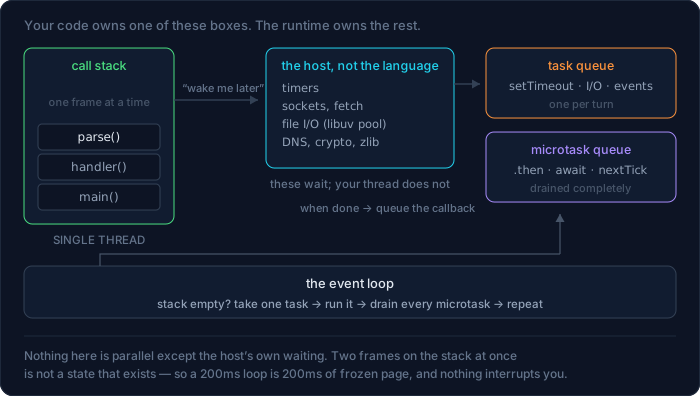
setTimeout isn't part of JavaScript. Neither is fetch, or fs.readFile, or addEventListener. Look for them in the ECMAScript spec and you won't find them — they're provided by whatever is hosting the engine: the browser (Web APIs, mostly C++) or Node (libuv, mostly C).
That distinction is the mechanism, not trivia. When you call fetch, your thread hands the host a URL and a callback and returns immediately. The socket work happens on the host's own threads. When the response arrives, the host doesn't run your callback — it can't, your thread owns the stack — it puts the callback in a queue and waits for you to be free.
Which means asynchronous code in JavaScript is a two-party arrangement:
- Your thread registers interest and gets out of the way.
- The host does the slow thing in its own time.
- The host queues your callback.
- The loop hands it back to your thread when the stack is empty.
Node's libuv keeps a small thread pool (4 by default, UV_THREADPOOL_SIZE) for work that has no OS-level async API — file I/O, DNS, crypto.pbkdf2, zlib. Sockets don't use it; they use the OS event notification mechanism directly (kqueue on macOS, epoll on Linux). This is why "Node is single-threaded" is a half-truth: your JavaScript is single-threaded. The process is not.
One turn of the loop
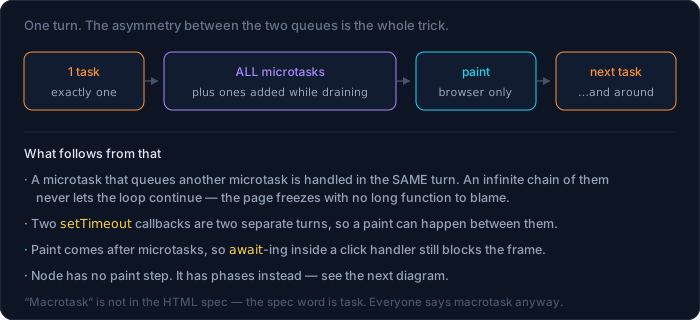
The loop itself is almost embarrassingly simple. Is the stack empty? Take one task, run it to completion, then drain every microtask. Repeat.
The asymmetry in the middle is the part to internalise: one task per turn, but all microtasks — including microtasks queued by the microtasks you just ran. Two queues, two very different rules.
Tasks (what everyone calls macrotasks): setTimeout, setInterval, I/O completions, DOM events, setImmediate in Node.
Microtasks: .then / .catch / .finally callbacks, everything after an await, queueMicrotask, and in Node, process.nextTick (its own queue, drained even before microtasks).
In the browser there's a third step: after microtasks, before the next task, the browser may paint. That's why an expensive .then chain freezes an animation just as thoroughly as a for loop.
The ordering puzzle — and the surprise
Here's the classic interview question. Six lines, five outputs. Predict the order:
console.log('1 sync start');
setTimeout(() => console.log('5 setTimeout 0'), 0);
setImmediate(() => console.log('6 setImmediate'));
Promise.resolve().then(() => console.log('4 promise.then'));
process.nextTick(() => console.log('3 process.nextTick'));
console.log('2 sync end');
The textbook answer: synchronous lines first, then nextTick, then promises, then timers. Run it as CommonJS and that's exactly what you get:
$ node order.cjs
1 sync start
2 sync end
3 process.nextTick
4 promise.then
6 setImmediate
5 setTimeout 0
Now save the identical bytes as an ES module:
$ node order.mjs
1 sync start
2 sync end
4 promise.then          ← promise BEFORE nextTick
3 process.nextTick
6 setImmediate
5 setTimeout 0
promise.then and process.nextTick swap places depending on module system. I did not expect that, and I've read a dozen articles on this topic that assert the nextTick-always-wins rule without qualification.
The reason: an ES module's top-level body is itself evaluated inside a promise job. So when your last synchronous line finishes, you are already inside a microtask, and V8 finishes draining the microtask queue — which now contains your .then — before returning control to Node, which is the only moment Node gets to drain its own nextTick queue. In CommonJS the module body is plain synchronous code, control returns to Node first, and nextTick goes first as advertised.
Wrapping the code in a function inside the .mjs doesn't change it back — it's the module, not the call depth:
$ node order2.mjs      # same code, inside function run(); run()
4 promise.then
3 process.nextTick
The practical lesson is not "memorise the exception". It's that nextTick-vs-promise ordering is too fragile to build on. Inside your own module you'd have to know how you're loaded. nextTick also loses its main historical use — it exists so a library can guarantee "my callback fires after the current operation, before I/O" — now that queueMicrotask is standard everywhere. Use queueMicrotask for new code and don't build logic that depends on which microtask queue wins.
The ordering that is stable, and that you can rely on:
| Runs when | Node | Browser |
|---|---|---|
| Now, on the stack | synchronous code | synchronous code |
| End of this turn | nextTick → microtasks |
microtasks |
| A later turn | timers, I/O, setImmediate |
timers, events |
And nesting behaves the way "drain until empty" implies — a microtask queued from inside a nextTick callback still waits its turn behind microtasks that were already queued:
process.nextTick(() => { console.log('tick 1');
  Promise.resolve().then(() => console.log('  micro inside tick 1')); });
process.nextTick(() => console.log('tick 2'));
Promise.resolve().then(() => { console.log('micro 1');
  process.nextTick(() => console.log('  tick inside micro 1')); });
Promise.resolve().then(() => console.log('micro 2'));
tick 1
tick 2
micro 1
micro 2
  micro inside tick 1
  tick inside micro 1
Both queues are FIFO, both are drained to empty, and the drains alternate. Once you see it as two buckets rather than a priority list, the output stops being a puzzle.
The browser, measured
Same experiment in a real browser (WebKit), where there's no nextTick or setImmediate:
console.log('1 sync start');
setTimeout(() => log('setTimeout 0'), 0);
queueMicrotask(() => log('queueMicrotask'));
Promise.resolve().then(() => log('promise.then'));
console.log('2 sync end');
1 sync start
2 sync end
queueMicrotask
promise.then
setTimeout 0
queueMicrotask and .then share one queue, in registration order. No surprises here — the browser model is the simpler of the two.
Node's phases, and the one timer race you'll hit
"A later turn" is doing a lot of work in that table, because Node's turn has structure: six phases, each with its own queue.
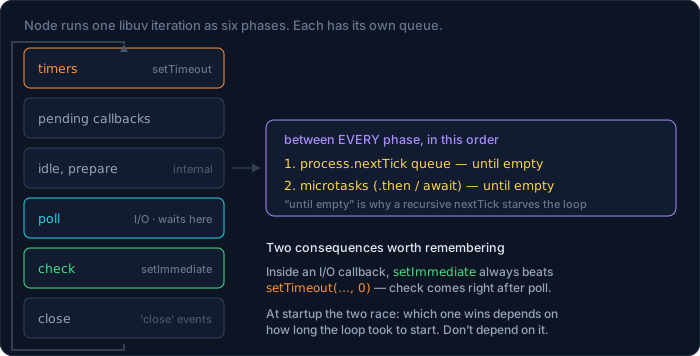
You rarely need this diagram — until you hit the setTimeout(fn, 0) versus setImmediate question, which comes up in real code whenever someone wants to "run this after the current work finishes".
At startup, the two race:
setTimeout(() => process.stdout.write('T'), 0);
setImmediate(() => process.stdout.write('I'));
$ for i in $(seq 1 8); do node race.cjs; done
ITITITITITITITIT
Eight runs, setImmediate first every time on this machine — but Node's own docs say this order is not guaranteed at startup, because it depends on how long the process took to boot relative to the timer's 1ms floor. On a busier machine you will see it flip. Eight for eight is not proof of a rule; it's proof that a flaky ordering can look stable long enough to become a load-bearing assumption.
Inside an I/O callback, though, the answer is defined by the phase order — check comes immediately after poll:
fs.readFile(__filename, () => {
  setTimeout(() => console.log('setTimeout inside I/O'), 0);
  setImmediate(() => console.log('setImmediate inside I/O'));
});
setImmediate inside I/O
setTimeout inside I/O
Three runs, same order, and it will stay that way. If you want "after the current phase, before any timers", setImmediate is the tool — and despite the name, it is not immediate: process.nextTick is the one that runs sooner. The two names are backwards, a documented regret in Node's history that is too late to fix.
Callbacks: the original contract
Before promises there was one convention, and Node still speaks it everywhere: pass a function, get called back, errors come first.
fs.readFile('/no/such/file', 'utf8', (err, data) => {
  if (err) return console.log(`err.code = ${err.code} · data = ${data}`);
  console.log('read', data.length);
});
err.code = ENOENT · data = undefined
Two rules make that convention work, and both are load-bearing:
- Check
errfirst, and return. Notelse—return. A missingreturnafter handling an error is the most common bug in callback code, because execution continues into the happy path withdataundefined. - Never throw inside a callback and expect the caller to catch it. We'll see why in a moment.
The famous complaint about callbacks is the shape — the sideways pyramid:
getUser(id, (err, user) => {
  if (err) return done(err);
  getOrders(user.id, (err, orders) => {
    if (err) return done(err);
    getItems(orders[0].id, (err, items) => {
      if (err) return done(err);
      done(null, { user, orders, items });
    });
  });
});
But indentation is the least of it — that can be fixed with named functions. The real problems are structural, and worth naming because promises are designed as answers to exactly these:
- Error handling doesn't compose. Every level repeats
if (err) return done(err). Miss one and the error vanishes silently. - You lose the stack. More on this below; it's worse than people think.
- You gave up control. You handed your continuation to someone else's code and now they decide when — and how many times — it runs. A library with a bug that calls your callback twice will cheerfully charge the card twice, and nothing in the code you wrote says it shouldn't.
That third one is the deep problem: inversion of control. Promises take it back, because a promise settles once, and it's yours to inspect.
The stack loss, measured
Here's what it costs you in a debugger. Three levels of callbacks, error created in a timer:
function step3(cb) { setTimeout(() => cb(new Error('failed in callback')), 10); }
function step2(cb) { step3(cb); }
function step1(cb) { step2(cb); }
step1((err) => console.log(err.stack));
Error: failed in callback
    at Timeout._onTimeout (cbstack.mjs:1:42)
    at listOnTimeout (node:internal/timers:588:17)
    at process.processTimers (node:internal/timers:523:7)
step1, step2, step3 are nowhere in that trace. They had already returned — their frames popped long before the timer fired, and the only thing on the stack is Node's timer plumbing. Now the same three levels with async/await:
async function inner()  { await null; throw new Error('failed after await'); }
async function middle() { await inner(); }
async function outer()  { await middle(); }
outer().catch(e => console.log(e.stack));
Error: failed after await
    at inner (asyncstack.mjs:1:44)
    at async middle (asyncstack.mjs:2:27)
    at async outer (asyncstack.mjs:3:26)
There they are, marked at async. V8 reconstructs the logical chain across suspension points — you get the causal story back. On a bad night this difference is worth more than the syntax.
Promises: a value that isn't there yet
A promise is an object in one of three states: pending, then either fulfilled with a value or rejected with a reason. The transition happens once and is permanent. That's the entire contract, and everything else is convenience on top.
Two things about promises surprise people, and both are visible in five lines:
console.log('1 before');
const p = new Promise((resolve) => {
  console.log('2 executor — runs NOW, synchronously');
  resolve('done');
});
console.log('3 after creating the promise');
p.then(v => console.log('5 then:', v));
console.log('4 end of file');
1 before
2 executor — runs NOW, synchronously
3 after creating the promise
4 end of file
5 then: done
First: the function you pass to new Promise runs immediately and synchronously. Creating a promise doesn't defer anything; wrapping a slow synchronous function in new Promise makes it exactly as blocking as it was.
Second: .then is always asynchronous — even here, where the promise was already resolved before .then was attached. 5 still comes last. That guarantee is deliberate: a promise callback never runs synchronously, so .then can't reorder your code depending on whether the value happened to be ready. Callbacks written by hand often do have that inconsistency, and it's a rich source of bugs.
The chain, and the one mistake everybody makes
.then returns a new promise, which is what makes chaining flat instead of nested. The rule to internalise: whatever you return from .then becomes the next .then's input — and if you return a promise, the chain waits for it.
const get = (v) => new Promise(r => setTimeout(() => r(v), 20));

get(1).then(v => { get(v + 1); })
      .then(v => console.log('forgot return →', v));
get(1).then(v => { return get(v + 1); })
      .then(v => console.log('with return  →', v));
forgot return → undefined
with return  → 2
One missing return and the chain doesn't wait, the value is gone, and — worse — an error inside that unreturned promise won't be caught by the chain's .catch either. Braces are where this hides: v => get(v) returns; v => { get(v) } does not. When a chain mysteriously yields undefined, look for a brace before you look at anything else.
Error handling composes properly, which was the whole point:
fetchUser(id)
  .then(user => fetchOrders(user.id))
  .then(orders => render(orders))
  .catch(err => showError(err))        // catches a rejection from ANY step above
  .finally(() => setLoading(false));   // runs either way; passes the value through
One .catch covers the whole chain, because a rejection skips every .then until it finds a handler. Note the ordering of the last two: .finally after .catch means the spinner stops even when the error handler itself is what threw.
async/await: the same thing, without the plumbing
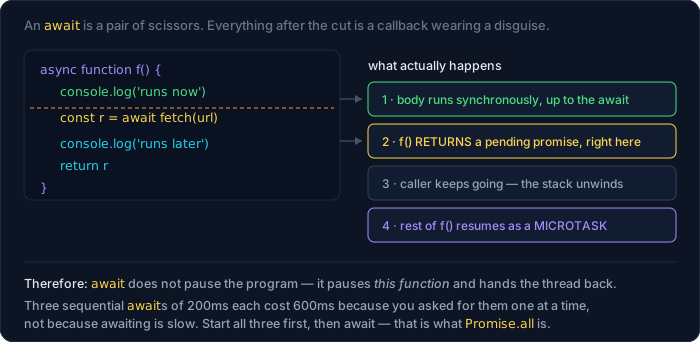
async/await is not a different mechanism. An async function always returns a promise, and await unwraps one. The value is that your code reads top-to-bottom while behaving asynchronously — but only if you know where the seams are.
async function f() {
  console.log('2 entered f');
  await null;                          // await a non-promise value
  console.log('4 after the await');
}
console.log('1 before f');
f();
console.log('3 after calling f — f is not finished');
Promise.resolve().then(() => console.log('5 microtask queued later'));
1 before f
2 entered f
3 after calling f — f is not finished
4 after the await
5 microtask queued later
Line 3 printing before line 4 is the whole idea. Calling f() runs its body synchronously up to the first await, then returns a pending promise to the caller and gives the thread back. What comes after the await is a continuation scheduled as a microtask. await suspends the function, never the program.
Notice await null still costs a tick, even though null isn't a promise — await wraps whatever you give it. And a settled promise costs exactly one tick in modern V8:
async function a() {
  await Promise.resolve(); console.log('a1');
  await Promise.resolve(); console.log('a2');
}
a();
Promise.resolve().then(() => console.log('t1'))
  .then(() => console.log('t2')).then(() => console.log('t3'));
a1
t1
a2
t2
t3
Perfectly interleaved: one tick per await, one tick per .then. (This is newer than most blog posts about it — await used to cost three ticks before the V8 7.2 optimisation, which is why old articles show a different interleaving. Another reason to run things.)
The sequential-await trap
This is the single most expensive misunderstanding in async JavaScript, and it costs whole seconds in real apps:
const sleep = (ms, label) => new Promise(r => setTimeout(() => r(label), ms));

async function sequential() {
  const a = await sleep(200, 'a');
  const b = await sleep(200, 'b');
  const c = await sleep(200, 'c');
  return [a, b, c];
}
async function parallel() {
  const [a, b, c] = await Promise.all(
    [sleep(200, 'a'), sleep(200, 'b'), sleep(200, 'c')]);
  return [a, b, c];
}
sequential [abc] 604ms
parallel   [abc] 202ms
Three times slower, same result, and nothing about the first version looks wrong. The rule: await on its own line means "and I can't start the next thing until this lands". If that's not true — if the three requests don't depend on each other — start them all first and await the collection.
The fix is mechanical. Anywhere you see a loop with an await inside and independent iterations:
// serial: one request at a time
for (const id of ids) results.push(await fetchUser(id));

// concurrent: all at once
const results = await Promise.all(ids.map(id => fetchUser(id)));
With one caveat that matters at scale: Promise.all over 5,000 ids opens 5,000 requests at once, which will get you rate-limited or run you out of sockets. Batch it (p-limit, or chunk the array) — concurrency you chose beats concurrency that happened to you.
When the results genuinely arrive over time and you want to process each as it comes, that's what async iterators are for:
async function* ticker(n) {
  for (let i = 1; i <= n; i++) {
    await new Promise(r => setTimeout(r, 60));
    yield i;
  }
}
for await (const v of ticker(3)) console.log(`got ${v} at ${Date.now() - t0}ms`);
got 1 at 61ms
got 2 at 124ms
got 3 at 185ms
for await is sequential by design — one item at a time, which is exactly right for a stream you're consuming and exactly wrong for a list of independent fetches.
The four combinators
await Promise.all([a, b])          // all values, or reject on the FIRST rejection
await Promise.allSettled([a, b])   // never rejects: [{status, value|reason}, …]
await Promise.race([a, b])         // first to SETTLE, fulfilled or rejected
await Promise.any([a, b])          // first to FULFILL; AggregateError if all reject
Run against a fast failure and a slow success:
all       → [ 1, 2 ]
all error → fails fast
allSettled→ [{"status":"fulfilled","value":1},{"status":"rejected","reason":{}}]
race      → fast
any error → AggregateError ["a","b"]
Two details from that output worth keeping. Promise.all rejects the moment one input rejects — it does not wait for the others, and the ones already in flight keep running (there's no cancellation). Use allSettled when you want every result regardless, which is almost always right for "load six independent widgets".
And look at allSettled's JSON: "reason":{}. An Error serialises to an empty object, because its properties aren't enumerable. If your logging does JSON.stringify(err) you have been shipping empty braces to your log aggregator; use err.stack or { message: err.message, stack: err.stack }.
Talking to callback-shaped code
You will meet APIs older than promises — Node's own fs, most database drivers from before 2018, anything built on events. Three ways to bring them into promise-land, in order of preference.
util.promisify works on anything following the error-first convention:
import { promisify } from 'node:util';
const readFile = promisify(fs.readFile);
const text = await readFile('./notes.md', 'utf8');
(For fs specifically, skip it — node:fs/promises already exists. Use promisify for the third-party driver that never got a promise API.)
events.once turns "wait for one event" into an await, which is otherwise surprisingly fiddly:
import { once } from 'node:events';
setTimeout(() => emitter.emit('ready', 42), 30);
const [value] = await once(emitter, 'ready');     // → 42
It resolves with an array because events can carry several arguments, and — the part that makes it worth using over a hand-rolled new Promise — it also rejects if the emitter emits 'error' first, which is the case everybody forgets.
Hand-wrapping, when the API is neither:
const connect = (url) => new Promise((resolve, reject) => {
  const socket = weirdLib.open(url);
  socket.onopen  = () => resolve(socket);
  socket.onerror = (e) => reject(e);              // both paths, always
});
Two rules when you write these by hand. Call resolve or reject on every path, or you've created a promise that hangs forever with no error to debug — a leak that shows up as a request timing out with no logs. And don't put logic in the executor beyond the wiring: it runs synchronously, so anything slow in there blocks the caller before the promise even exists.
Three patterns worth stealing
Beyond Promise.all, most real async code needs the same handful of shapes. These are small enough to write yourself, and knowing them is the difference between using promises and being fluent.
A deadline. No promise is cancellable, but the underlying operation often is:
const res = await fetch(url, { signal: AbortSignal.timeout(3000) });
ok 200
timeout 1ms → TimeoutError · The operation was aborted due to timeout
AbortSignal.timeout aborts the request. Promise.race([fetch(url), sleep(3000)]) only stops you waiting — the socket stays open, the server keeps working, and under load you've now got two problems. Use the signal.
Retry with backoff, for anything crossing a network:
async function retry(fn, { tries = 4, base = 50 } = {}) {
  for (let i = 0; i < tries; i++) {
    try { return await fn(); }
    catch (err) {
      if (i === tries - 1) throw err;
      const wait = base * 2 ** i;
      console.log(`  ${err.message} → retry in ${wait}ms`);
      await new Promise(r => setTimeout(r, wait));
    }
  }
}
  fail #1 → retry in 50ms
  fail #2 → retry in 100ms
ok on attempt 3 (154ms total)
Doubling the wait matters: retrying immediately, in a loop, from every client at once is how a brief blip becomes an outage. In production add jitter (wait * (0.5 + Math.random())) so your clients don't synchronise, and only retry what's safe to repeat — a GET, yes; a payment POST, only with an idempotency key.
A concurrency limit, the missing counterpart to Promise.all:
async function mapLimit(items, limit, fn) {
  const out = []; const executing = new Set();
  for (const [i, item] of items.entries()) {
    const p = Promise.resolve().then(() => fn(item, i));
    out.push(p); executing.add(p);
    p.finally(() => executing.delete(p));
    if (executing.size >= limit) await Promise.race(executing);
  }
  return Promise.all(out);
}
12 jobs, limit 3   → peak concurrency 3,  164ms
12 jobs, no limit  → peak concurrency 12, 41ms
Four times slower and that is the point — the unlimited version peaked at twelve simultaneous jobs, and with twelve thousand items it would peak at twelve thousand. The Promise.race on the in-flight set is the whole trick: wait for any one to finish, then start the next. (p-limit does this in a library if you'd rather not own it; the reason to read the eight lines is that "why is my import script rate-limited" becomes obvious once you have.)
Where errors go when nobody's looking
Three failure modes, all of which look like "the error disappeared".
1. throw inside a callback cannot be caught outside it.
try {
  setTimeout(() => { throw new Error('error in a timer'); }, 0);
} catch (e) {
  console.log('caught:', e.message);      // never runs
}
uncaughtException: error in a timer
By the time the timer fires, the try block has long since finished — the stack that contained it is gone. try/catch is a property of the stack, and asynchronous callbacks run on a fresh one. This is precisely the hole async/await fills: because await resumes inside your function, a try/catch around it works the way you'd expect.
2. A rejected promise nobody handles kills the process.
async function boom() { throw new Error('nobody awaited me'); }
boom();                                       // no await, no .catch
setTimeout(() => console.log('does this line run?'), 50);
Error: nobody awaited me
    at boom (floating.mjs:1:31)
[…]
$ echo $?
1
The setTimeout never printed. Since Node 15 an unhandled rejection is fatal by default — the process exits with code 1. That's the right default (a silently swallowed failure is worse) but it means every promise you start needs an owner: await it, return it, or attach .catch. A floating promise is a landmine with a 50ms fuse.
If you fire and genuinely don't care, say so explicitly — void doThing().catch(logger.error) — so the next reader knows it was a decision.
3. The last-resort handlers.
process.on('unhandledRejection', (r) => { logger.fatal(r); process.exit(1); });
process.on('uncaughtException',  (e) => { logger.fatal(e); process.exit(1); });
These are for logging on the way out, not for recovery. After an uncaught exception your process is in an unknown state — half-finished writes, held locks — and the honest move is to log and let the supervisor restart you. In the browser, the equivalents are window.onunhandledrejection and window.onerror, and there they are worth using for real: shipping the error to your monitoring endpoint is the only way you'll ever learn it happened.
You can still block the loop, and it will be your code
Async syntax doesn't buy you a second thread. Everything you write still runs on the one stack, and the loop stops for exactly as long as you hold it. Three ways people do it by accident.
Parsing something big. No loops, no obvious hot spot — just one library call:
const big = JSON.stringify(Array.from({ length: 400_000 },
  (_, i) => ({ id: i, name: 'user ' + i, tags: ['a', 'b'] })));
const t0 = Date.now();
setTimeout(() => console.log(`  0ms timer really ran after ${Date.now() - t0}ms`), 0);
const parsed = JSON.parse(big);
console.log(`  JSON.parse blocked ${Date.now() - t0}ms (${parsed.length} items)`);
string is 19.6MB
  JSON.parse blocked 110ms (400000 items)
  0ms timer really ran after 110ms
110 milliseconds of total silence for a 20MB payload. In a server that's every concurrent request delayed by 110ms — not just the one doing the parsing. JSON.parse, JSON.stringify, crypto.pbkdf2Sync, zlib.gzipSync, fs.readFileSync, a big .sort(), template rendering: all synchronous, all yours.
And here is why that matters more on a server than on a page. A tiny HTTP server with two routes — /ping returns immediately, /report does that same 20MB parse — hit by five pings on their own, then by five pings while one report is running:
const server = http.createServer((req, res) => {
  if (req.url === '/report') { JSON.parse(big); res.end('report'); }
  else res.end('pong');
});
/ping alone      : 13ms 10ms 10ms 11ms 10ms
/report          : 111ms
/ping alongside  : 110ms 110ms 111ms 112ms 111ms
The pings went from 10ms to 110ms, and none of them asked for a report. That's the shape of the incident you'll actually get paged for: every endpoint's p99 degrades, the slow one isn't obviously to blame, and CPU looks unremarkable because 100ms of parsing per request isn't much CPU — it's just indivisible. One user's expensive request is every user's latency, because they share a thread.
Starving the loop with microtasks. This one is nastier, because there's no long function anywhere:
const t0 = Date.now();
setTimeout(() => console.log(`the 0ms timer ran after ${Date.now() - t0}ms`), 0);
function spin() { if (Date.now() - t0 < 300) process.nextTick(spin); }
spin();
the 0ms timer ran after 300ms
Each nextTick callback is microscopic. But the queue is drained to empty before the loop advances, and a callback that re-queues itself makes "empty" a moving target. Same trick with queueMicrotask or a self-chaining .then freezes a browser tab identically — and profilers show no long task, because every individual task is 2µs.
Measuring it. The symptom to watch for is lag: how late a timer is relative to when you asked for it.
let last = Date.now();
setInterval(() => {
  const now = Date.now();
  console.log(`lag ${now - last - 100}ms`);       // asked for 100ms; the rest is lag
  last = now;
}, 100);
setTimeout(() => { const t = Date.now(); while (Date.now() - t < 450) {} }, 250);
lag    2ms
lag    0ms
lag  400ms
lag    1ms
Two healthy ticks, one 400ms hole where the blocking work sat, then healthy again. In production you don't want a setInterval printing to stdout, you want a histogram — Node has one built in:
import { monitorEventLoopDelay } from 'node:perf_hooks';
const h = monitorEventLoopDelay({ resolution: 10 });
h.enable();
// … later, on your /metrics endpoint:
console.log(`min ${h.min} · mean ${h.mean} · p99 ${h.percentile(99)}`);
min 10.7ms · mean 18.2ms · p99 205.5ms
Values come back in nanoseconds; divide by 1e6 for ms as above. That p99 is the number to alarm on. A mean of 18ms with a p99 of 205ms is the signature of exactly what we did here: mostly fine, with a fat synchronous thing happening occasionally. Averages hide it; percentiles don't.
Fixing it. Three options, in the order I'd try them:
- Use the async version.
fs.promises.readFile,crypto.pbkdf2,zlib.gzip— the callback/promise forms hand the work to libuv's pool and your loop stays free. This is free performance and people skip it becauseSyncis easier to type. - Chunk the work. Process 500 items, yield with
setImmediate(Node) orawait new Promise(r => setTimeout(r))(browser), continue. Total time gets slightly worse; responsiveness gets dramatically better. - Move it off-thread. For genuine CPU work, that's
worker_threadsin Node and a Web Worker in the browser:
if (isMainThread) {
  const timer = setInterval(
    () => console.log(`  main loop still alive at ${Date.now() - t0}ms`), 100);
  const w = new Worker(new URL(import.meta.url));
  w.on('message', () => console.log(`worker returned after ${Date.now() - t0}ms`));
} else {
  let sum = 0; for (let i = 0; i < 5e8; i++) sum += i;
  parentPort.postMessage(sum);
}
  main loop still alive at 102ms
  main loop still alive at 202ms
  main loop still alive at 304ms
  main loop still alive at 404ms
worker returned after 497ms
Half a billion additions, and the main loop never missed a beat — the interval fired on schedule the whole time. That's the difference between "async" and "concurrent": the first is about not waiting, the second needs another thread.
The bug that isn't about ordering — it's about identity
Everything so far has been "when does this run". There's a second family of async bugs where the ordering is fine and the answer is wrong, and it accounts for a startling share of "the UI shows the wrong thing sometimes" reports.
A search box. The user types a, then ab. Two requests go out. The response for a happens to be slower — a cold cache, a bigger result set, bad luck:
const search = (q) => new Promise(r =>
  setTimeout(() => r(`results for "${q}"`), q === 'a' ? 300 : 60));

let shown = null;
async function naive(q) {
  shown = await search(q);
  console.log(`  UI shows: ${shown}`);
}

naive('a'); naive('ab');
  UI shows: results for "ab"
  UI shows: results for "a"
  FINAL state: results for "a"   ← user typed "ab"
The screen ends up showing results for a query the user has already moved past. No error, no warning, nothing in the logs, and it reproduces only when the network cooperates — which is why it survives code review and lands in production.
Nothing is wrong with the ordering: both awaits resumed exactly when their promise settled. The bug is that shown = … doesn't ask whether this response is still the one we want. Every async write to shared state needs that question answered, and there are three ways to answer it.
A sequence token — smallest fix, works anywhere:
let latest = 0;
async function guarded(q) {
  const id = ++latest;
  const res = await search(q);
  if (id !== latest) return;      // a newer request has since started
  shown = res;
}
  UI shows: results for "ab"
  dropped stale response for "a"
  FINAL state: results for "ab"
Cancel the old request — better, because it also saves the bandwidth:
let controller;
async function search(q) {
  controller?.abort();                       // cancel whatever is in flight
  controller = new AbortController();
  const res = await fetch(`/api/search?q=${q}`, { signal: controller.signal });
  return res.json();                         // an aborted fetch rejects; catch it
}
Let the framework own it. In React, that's the cleanup function — the effect for the previous query gets torn down before the new one runs, and a captured ignore flag is the sequence token in idiomatic form:
useEffect(() => {
  let ignore = false;
  search(query).then(r => { if (!ignore) setResults(r); });
  return () => { ignore = true; };
}, [query]);
Query libraries (TanStack Query, SWR, RTK Query) exist substantially to make you stop writing this by hand, and they are worth it the moment you have more than two of these.
The general rule is worth stating plainly, because it applies far beyond search boxes: after an await, everything you captured before it may be out of date. The component may have unmounted, the user may have logged out, the record may have been deleted, a newer request may have already answered. Code after an await runs in a world that has moved on — check what you assume before you write to anything shared.
Timers lie, and it's not their fault
setTimeout(fn, 100) does not mean "in 100ms". It means "not before 100ms, then whenever the loop gets to it". Four consequences worth knowing before you build on timers.
setInterval drifts when the callback is slow. The interval is measured from when the callback starts, and a callback that overruns pushes everything back:
const id = setInterval(() => {
  const t = Date.now(); while (Date.now() - t < 60) {}   // 60ms work, 50ms tick
  console.log(`tick ${++n}: due at ${n * 50}ms, actually ${Date.now() - t0}ms`);
  if (n === 4) clearInterval(id);
}, 50);
tick 1: due at 50ms, actually 111ms
tick 2: due at 100ms, actually 172ms
tick 3: due at 150ms, actually 232ms
tick 4: due at 200ms, actually 292ms
By tick 4 we're 92ms behind and the gap grows forever. For anything where accumulated error matters — a clock, a progress estimate, a poll with a deadline — don't count ticks. Read the wall clock each time, or re-arm a setTimeout with the remaining delay computed from a fixed start point.
Nested timers get clamped. The HTML spec requires browsers to force a minimum of 4ms once you're five levels deep in nested timers, so setTimeout(fn, 0) in a self-scheduling loop tops out around 250 iterations per second. This is why setTimeout(…, 0) is a poor yield primitive in the browser; MessageChannel or the newer scheduler.yield() avoid the clamp.
Background tabs are throttled, and animation frames stop entirely. I measured this one by accident. Running the nested-timer probe inside a hidden tab:
{ gaps: [0.6, 0.2, 0, 0, 0, 0, 700.4, 4.6], visibility: 'hidden' }
A 700ms gap between two consecutive setTimeout(…, 0) calls. And requestAnimationFrame registered at the start had still not fired after 600ms — which is correct behaviour, not a bug: rAF is tied to painting, and a tab nobody can see doesn't paint. Two lessons, one for each side. If you rely on timers to keep something in sync while the tab is hidden, it won't be — check document.visibilityState and reconcile on visibilitychange. And if you're benchmarking anything timer- or frame-related, do it in a visible tab, or you'll conclude nonsense. I nearly wrote a paragraph about MessageChannel beating setTimeout off the back of numbers from that hidden tab.
In Node, setTimeout(fn, 0) is really 1ms, because libuv clamps the timeout to a minimum of one millisecond. If you want "as soon as this phase is done", the tool is setImmediate, not a zero timer.
Node and the browser: same loop, different rules
| Node | Browser | |
|---|---|---|
| Microtask queues | two: nextTick, then promises |
one |
| Yield to the loop | setImmediate |
MessageChannel, scheduler.yield() |
| Zero-delay floor | 1ms (libuv) | 4ms once nested 5 deep |
| Painting | none | after microtasks, before next task |
| Frame callback | none (setImmediate ≠ rAF) |
requestAnimationFrame |
| Off-thread work | worker_threads, libuv pool (4) |
Web Workers |
| Unhandled rejection | process exits, code 1 | logged; onunhandledrejection |
| Throttled when idle | no | yes — hidden tabs |
| Blocking I/O available | yes (readFileSync) — avoid |
no equivalent |
The one row that catches people moving between them: there is no paint step in Node, so the browser habit of "yield and let the frame render" has no meaning server-side, and setImmediate is not a frame callback. Conversely process.nextTick has no browser equivalent worth emulating — queueMicrotask is the portable one.
Reading async code in anger
A short list of what actually helps when something asynchronous is misbehaving.
Ask which queue. Nine out of ten "impossible ordering" bugs are one of three things: a microtask you thought was a task, a task you thought was a microtask, or an await in a loop you thought was concurrent. Print with a marker (console.log('A', performance.now())) rather than reasoning — the loop is cheap to interrogate and expensive to imagine.
Trust async stack traces. As shown earlier, await chains keep their causal frames (at async middle) while callbacks don't. If you're staring at a trace with nothing but node:internal/timers, that's a signal to promisify the boundary you're debugging, not to squint harder.
Watch loop delay, not CPU. A Node process at 40% CPU with a p99 loop delay of 300ms is in trouble; one at 90% CPU with a p99 of 5ms is fine and busy. CPU tells you how much work you're doing; loop delay tells you whether you're still able to answer.
Name your floating promises. Anything you don't await should have an explicit .catch. Enable @typescript-eslint/no-floating-promises if you're on TypeScript — it is the single highest-value async lint rule, because it turns a class of production crashes into a red squiggle.
The whole model, in six sentences
- Your JavaScript runs on one thread, and while it runs, nothing else does.
- Slow things are done by the host, not the language — you register a callback and get out of the way.
- Each turn: one task, then every microtask, then (in the browser) maybe a paint.
.thenand everything after anawaitare microtasks; timers and I/O are tasks.awaitsuspends the function it's in, hands the thread back, and resumes as a microtask — so sequential awaits of independent work is a bug, andPromise.allis the fix.- If the page or the server stalls, you're holding the stack. Find it with loop-delay percentiles, then make it async, chunk it, or move it to a worker.
| Symptom | First thing to check |
|---|---|
| UI freezes for a moment | a synchronous parse/sort/loop in a handler |
| UI freezes forever, no long task | self-requeueing microtask |
| Requests slow under load, CPU low | blocking call on the loop (*Sync, big JSON) |
| "Awaited it, still got a promise" | missing return in a .then, or forgotten await |
| Three requests take 3× as long | sequential awaits that should be Promise.all |
| UI sometimes shows an older result | stale response overwriting a newer one |
| Error vanished | throw in a callback, or a floating promise |
| Process died with code 1, no trace | unhandled rejection |
| Timer late by exactly one long task | that's loop delay — measure it |
Where to go next
The fastest way to make this stick is to watch it run rather than read about it. Three places on this site continue from here:
- Simulation Studio — animated walkthroughs of the queues, step by step, including the ordering puzzle from the top of this guide. Seeing one task complete while five microtasks drain behind it does more than another diagram.
- Code Lab — graded JavaScript and TypeScript exercises in a real runtime, including the async ones: fix the sequential awaits, un-starve the loop, promisify a callback API.
- Node.js from Zero to Production — where this stops being theory: streams and backpressure, why a blocking route ruins every other request, and reading loop-delay metrics off a live server.
And the habit that beat every article I read while writing this one: when you're not sure of the order, don't reason about it — put four console.logs in a file and run it. Twice, in both module systems.
Bài liên quan
Chuyên sâu
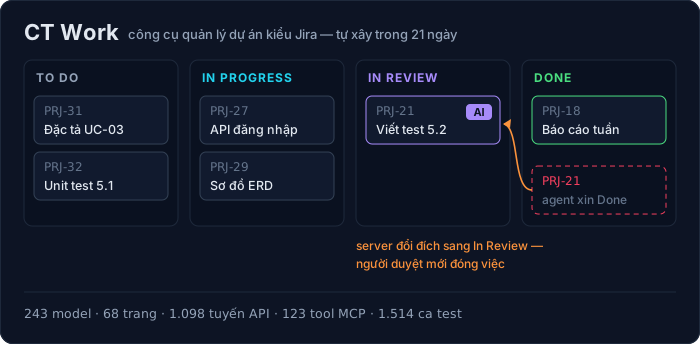
Tôi tự xây một công cụ kiểu Jira: CT Work sau 21 ngày, 113 commit và mười lỗi đã trả giá
Nhật ký kỹ thuật của CT Work, công cụ quản lý dự án và đồ án sinh viên FPT dùng thật: kiến trúc và mã thật, AI agent qua MCP, số đo bằng lệnh (243 model, 68 trang, 1.514 ca test), mười lỗi đã sửa, mẹo dùng — và khi nào không nên dùng.
Chuyên sâu
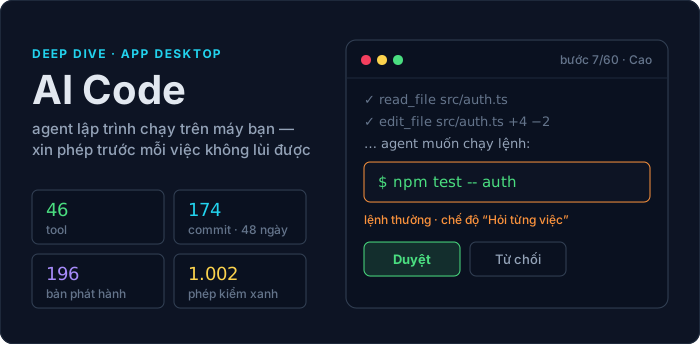
AI Code: agent lập trình trong app desktop — cách dựng, lỗi đã gặp, và cách dùng cho đáng tiền
Agent lập trình trong app desktop CuongThai: kiến trúc và mã thật, 174 commit trong 48 ngày, 9 lỗi đã gặp và cách sửa, vì sao giá một lượt không nói lên giá trong vòng lặp gọi tool, mẹo chọn model — và khi nào KHÔNG nên dùng.

Chuyên sâu
Mã hoá cho lập trình viên: AES, RSA, chữ ký số — và vì sao đừng bao giờ tự viết thuật toán
Bắt đầu từ một file bài thi .dat mở ra không được: entropy 7,99 nói lên điều gì, vì sao dò khoá AES là bất khả thi về mặt VẬT LÝ chứ không phải "rất khó", AES khác RSA ra sao (đo thật: chênh ~1.520 lần). Kèm thí nghiệm ECB làm lộ nguyên hình ổ khoá và sáu vụ sập kinh điển.
Chuyên sâu
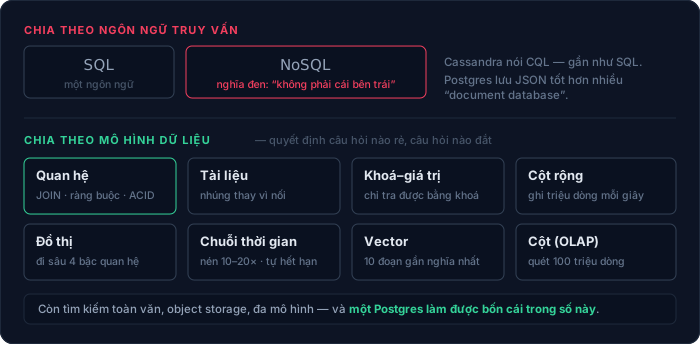
Có bao nhiêu loại cơ sở dữ liệu — và chọn cái nào cho việc gì
"SQL hay NoSQL" là phép chia sai: một vế là ngôn ngữ, vế kia nghĩa đen là "không phải cái kia". Bài này chia lại theo mô hình dữ liệu (11 loại), theo tải công việc và theo cách triển khai; giải thích ACID, mức cô lập, write skew, CAP bị hiểu sai ở đâu, B-tree so với LSM-tree; kèm cây quyết định, mười sai lầm hay gặp, và hồ sơ thật của chính trang này — 248 bảng trên một Postgres, một VPS 6GB.
Bình luận